

As promised, I wanted to share my learnings about .NET Aspire. In my original New Year’s post I expressed my desire to not just learn something new but to also apply it to a project I’m starting. It’s worth revisiting why I’m interested in Aspire.
The main reason that I have high hopes for Aspire’s success is a point I made in my New Year’s post. And that is that I have long felt there is a gap that exists in the application development life cycle where the application and its hosting are always treated separately from each other – while in reality, we know that the two are inextricably intertwined. For anyone that has done cloud native application development, you know it’s not just about writing your application and then magically getting it into the cloud. You still have to work out the cloud services your application will use, stand them up, configure them, bring some of that configuration into your application so you can use the services, etc. etc. It’s a lot. And don’t forget about logical service interdependencies. As the developer, you have to know what dependencies are there, be aware of the order of starting services, and working out the orchestration to make sure the cloud services are running and your app is deployed to get it all working.
If Microsoft can pull it off with Aspire, it would be a big win for the Developer and DevOps folks to bring some much-needed simplification to what is a very complex job today.
Where Did I Start?
To begin with, I started where most people go. I Googled it (OK, well I used Bing). First hit on the results list was the .NET Aspire overview. Here’s a quick summary of what Microsoft says about .NET Aspire.
Microsoft Overview of .NET Aspire
.NET Aspire is a comprehensive suite of tools, templates, and packages designed to facilitate the development of observable, production-ready applications. Delivered through a collection of NuGet packages, it addresses common challenges in modern app development, particularly in managing services like databases, messaging, and caching.
Key features of .NET Aspire include:
- Dev-Time Orchestration: Enhances the local development experience by simplifying the management of application configurations and interconnections. It allows developers to run and connect multi-project applications, container resources, and other dependencies seamlessly.
- Integrations: Offers NuGet packages for commonly used services, such as Redis and PostgreSQL, with standardized interfaces ensuring consistent and seamless integration into applications.
- Tooling: Provides project templates and tooling experiences for Visual Studio, Visual Studio Code, and the .NET CLI, aiding in the creation and interaction with .NET Aspire projects.
By leveraging these features, .NET Aspire streamlines the development process, allowing for quick development of interconnected apps with the flexibility to incorporate preferred tools and workflows. It’s important to note that while .NET Aspire’s orchestration enhances local development, it is not intended to replace production environment systems like Kubernetes.
Introduction to .NET Aspire on YouTube
If you’re a visual person, Microsoft has this YouTube series about .NET Aspire that may also help you get started. Welcome to .NET Aspire
In the first video of the series, they provide this high-level summary of the drivers behind their work to build Aspire.
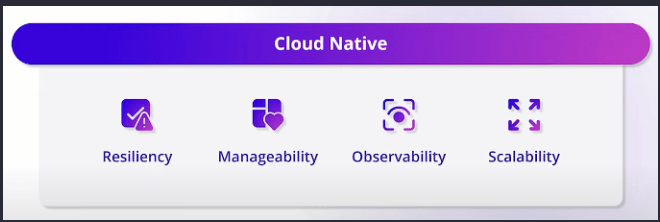
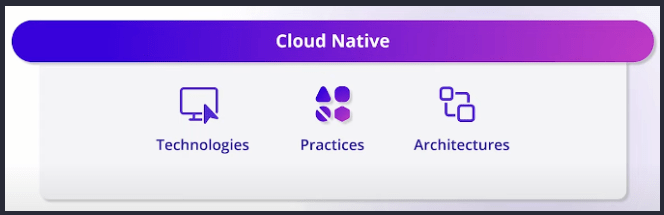
This looks good, right? Building cloud native applications involves each of these four things – at least if you’re doing it right. The speaker goes on to explain that Aspire is structured around these pillars.
Did Microsoft Miss the Whole Point?
But I’m skeptical. Microsoft said this in their own overview:
In .NET Aspire, “orchestration” primarily focuses on enhancing the local development experience by simplifying the management of your app’s configuration and interconnections. It’s important to note that .NET Aspire’s orchestration isn’t intended to replace the robust systems used in production environments, such as Kubernetes.
Why would they limit themselves like this? Yes, dev inner loop dependency management can be a challenge. But it doesn’t stop there. Your app isn’t really benefiting anyone if it isn’t in production. Why not extend that flow all the way to production?
My hope – which I’ve not yet realized through my reading on .NET Aspire – is that Aspire would finally bring about the unification of these two worlds.
Not Giving Up – At Least Not Yet
But I’ve not yet given up! There may still yet be something there for us. I also know that Aspire is new and that means that it’s missing stuff. I can live with that. For today, that may only mean that I can’t go full end-to-end with it. I want to see if it gives me something in my dev inner loop.
What’s Next?
I considered adding to this post the steps I went through to enable Aspire for my project, but I’m going to save that for my next post so that I can go into more detail.
I hope this has helped to at least get you thinking about the problem that is in need of being solved and bringing awareness to the effort that Microsoft is putting into .NET Aspire.
Let’s just say for the moment that I’m cautiously optimistic. I hope they follow through on the vision and not let it turn into the next Silverlight.
References
What is Aspire .NET?
https://www.reddit.com/r/dotnet/comments/1gu566y/what_is_aspire_net/?utm_source=share&utm_medium=web3x&utm_name=web3xcss&utm_term=1&utm_content=share_button
ASP.NET Community Standup – .NET Aspire Q&A
https://www.youtube.com/live/lRafjYUoV8U?si=5GzHl0gSZRQsIL3i
Why I won’t use .NET Aspire for now
https://event-driven.io/en/nay_to_aspire/
If you found this post informative, please considering subscribing to get new posts delivered to your inbox.



 The Architect Guild
Leave a comment